Millions in Excel
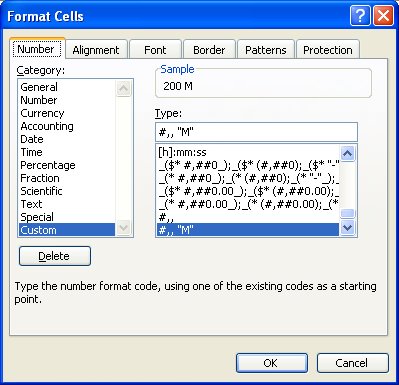
Excel has some cool formatting tricks up its sleeve and one of these is its ability to shrink really big numbers down to size.
So, if you have values in the millions - like your salary - Ha!, you can size them down to size using a custom format. Select the cells, choose Format, Cells, Number tab and click the Custom group and type #,,"M" and Excel will format 200,000,000 to read 200M! The numbers aren't altered it's just a simpler way of displaying them.
Since the Y axis of a chart inherits its formatting from the top left cell in the chart data range this lets you format a chart's Y axis to show the smaller values too.
Labels: Excel 2003, Excel 2007, number format
posted by Jane @ 10:55 AM
5 Comments
-


